
Review tab
The Review tab is where you manage the human review loop. When new evidence contradicts or improves an existing memory, Memory Layer creates a replacement proposal instead of silently overwriting it. This tab queues those proposals for your approval.
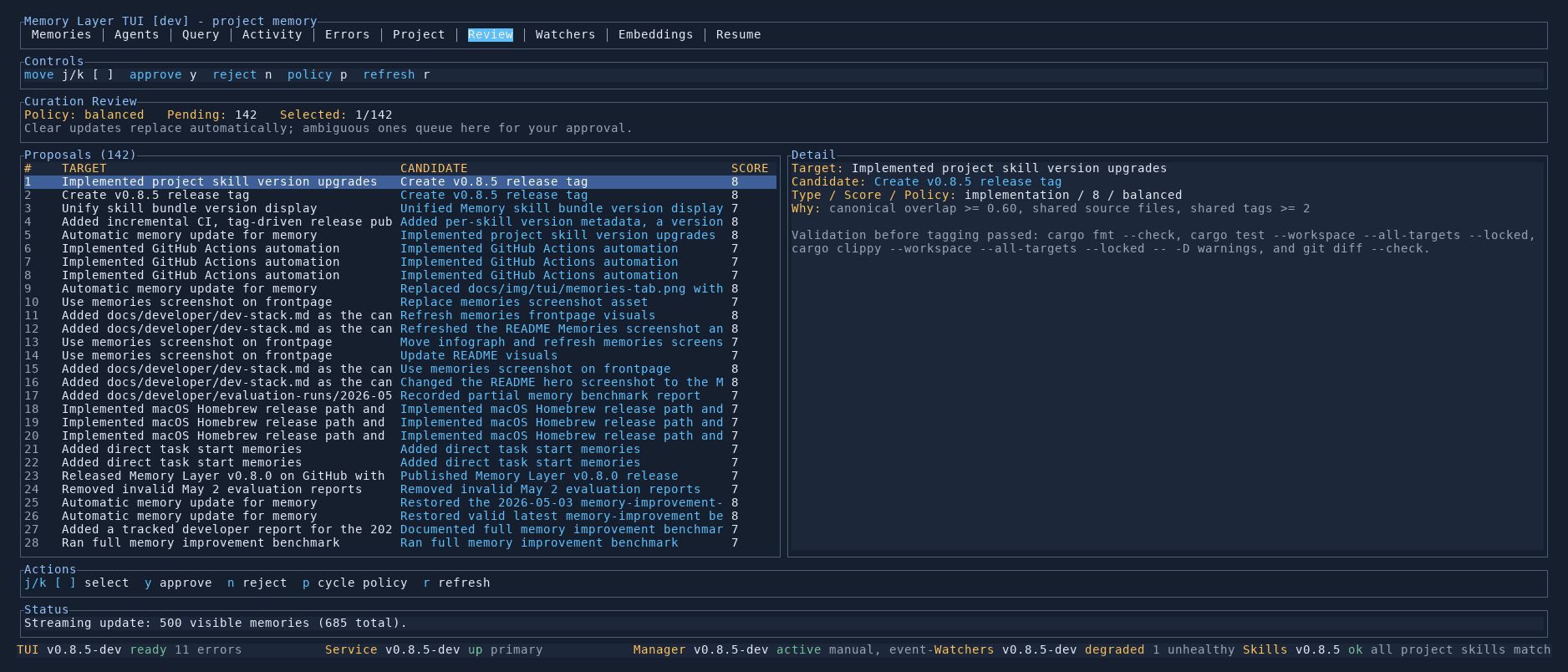
Curation status
The top of the tab shows summary counts: how many proposals are pending and how many have been processed. A large pending count usually means a recent scan or plan execution generated many candidate updates.
Proposals list
The left panel lists all pending proposals. Each row shows the target memory summary, the proposed action (replace, merge, archive), and metadata about the source. Proposals are colour-coded by type.
Use j/k to navigate between proposals.
Proposal detail
The right panel shows the full content of the selected proposal:
- Target — the existing memory that would be updated
- Policy — the curation policy that triggered the proposal (e.g.
implementation / 0.7 / balanced) - New content — what the memory would look like after approval
- Evidence — what changed to trigger this proposal
Reviewing
For each proposal you can:
- Approve (
a) — accept the replacement and update the memory - Reject (
R) — keep the current memory unchanged - Cycle policy (
c) — change the curation policy applied to this proposal
Controls
| Key | Action |
|---|---|
j / k | Move between proposals |
a | Approve the selected proposal |
R | Reject the selected proposal |
c | Cycle curation policy |
p | View policy details |
r | Refresh the proposals list |