
TUI
Activity tab
The Activity tab shows a chronological log of everything that has happened in the project — captures, reindexes, queries, watcher events, and more. This is the raw timeline that feeds the curation pipeline.
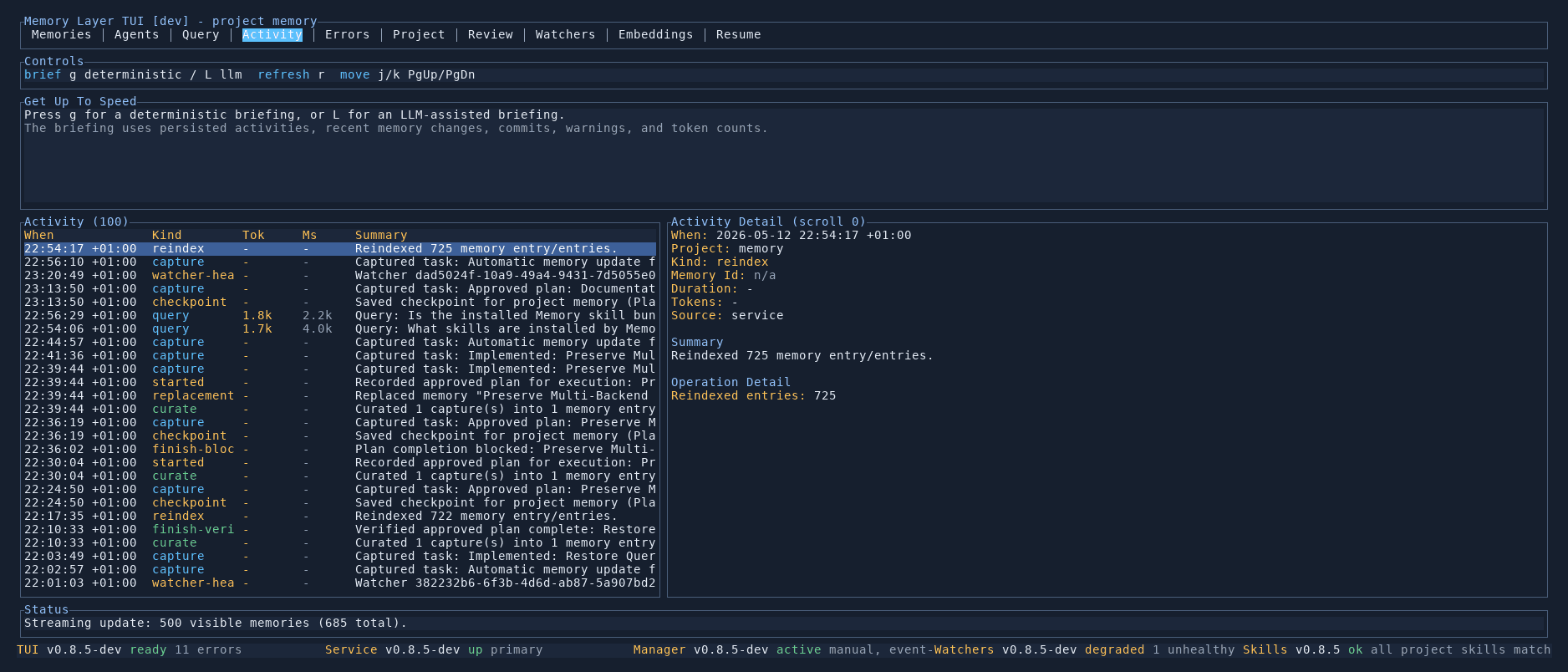
Activity list
The left panel shows all events in reverse chronological order. Each row includes:
- Timestamp — when the event occurred
- Type — the kind of event, colour-coded:
captured(new memory candidate),reindexed(search chunks rebuilt),query(a question was asked),checkpoint(a resume point was saved),watcher-health(a watcher status change) - Source — which component generated the event
- Summary — a short description of what happened
Activity detail
Selecting an event in the list shows its full content in the right panel, including the complete timestamp, source component, and expanded description.
Briefings
Press g for a deterministic briefing or l for an LLM-assisted briefing. Briefings summarise recent activity into a structured overview — useful for catching up after being away from the project.
Controls
| Key | Action |
|---|---|
j / k | Move between events |
PgUp / PgDn | Scroll by page |
g | Generate a deterministic briefing |
l | Generate an LLM-assisted briefing |
r | Refresh the activity list |